
API guide
Guide de référence des API
This guide presents the main APIs to be used when creating a connection between external software and SIGSCAN.
More details on each API can be found at the following address:
https://app.sigscan.eu/swagger-ui.html
Global architecture
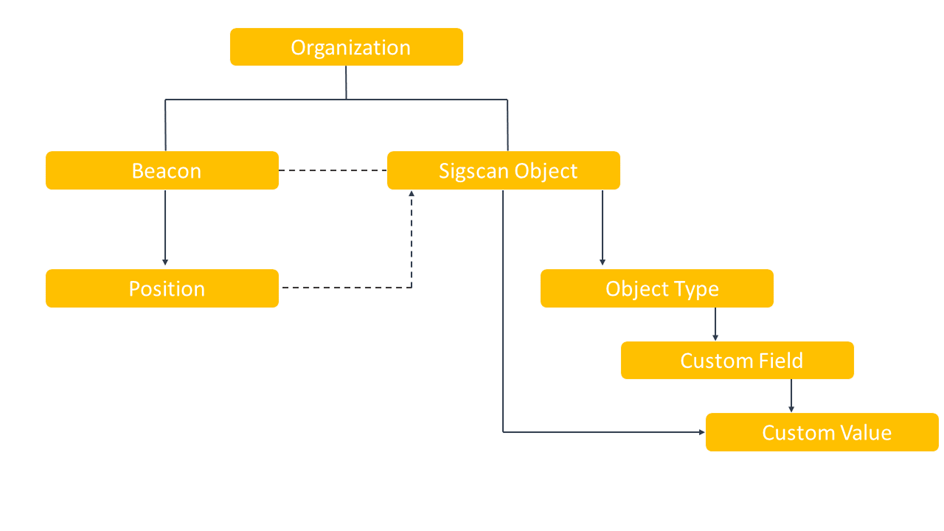
Organization: An organization is the biggest Sigscan unit that holds all the customer’s data. Customers can have one or more dedicated organizations hosted on the same Sigscan instance (typically a virtual machine).
Beacon: Also called “tag”, beacon is an IOT device being tracked in the Sigscan real time location system. It’s most often using the Bluetooth LE technology to advertise its presence.
Sigscan Object: It is a physical object we want to track within an indoor environment. When a beacon is associated with an object, the beacon’s position becomes the object’s position at this moment. In this manner we get object positions only when it’s associated with a beacon in the Sigscan software.
Object Type: Sigscan objects can be categorized by type. The concept of object type allows to group objects by their properties which are reflected in Custom Fields.
Custom Field/Custom Values: Custom Fields are created independently and then can be attached to an object type. Different object types can share one or more custom fields. Sigscan object of a specific object type automatically inherits all the custom fields attached to the object type.
Custom fields of an object can be filled in with values that correspond to custom values in Sigscan terminology. The type of data that a custom field can accept (number, string of characters, date, boolean, list) is defined during its creation.
1 APIs Quick Guide
1.1 API reference guide
This guide goes through the main APIs to be used while creating a connection between an external software and SIGSCAN.
More details about each API can be found at:
https://demo.sigscan-industry.com/swagger-ui.html
1.2 Authentication
Before calling any API, the client must authenticate. SIGSCAN authentication mechanism is based on a JWT token.
Method | POST |
Endpoint | /api/login |
Headers | Accept: application/json Content-Type: application/json |
Body (as HTTP POST Data) | { "username": "[username]", "password": "[password]" } |
Response | JWT Authentication Token |
Example:
curl -X POST https://demo.sigscan-industry.com/api/login -d '{"username": "john", "password": "johnpwd"}'
The response sent back by the server includes the JWT token in the HTPP Authorization header. This token must be included in the HTTP header of any subsequent requests as follow:
Authorization: Bearer eyJhbGciOiJIUzI1NiJ9.eyJzdWIiO…
1.3 Get your organization ID
The organizationId will be required in most of the API calls described below in this document. We recommend getting it right after the authentication for convenience.
Method | GET |
Endpoint | /api/organizations |
Headers | Authorization : Bearer [AuthToken] |
Request parameters | page=[pageNumber] size=[pageSize] sort=[fieldName],[ASC|DESC] name=[organizationName] |
Response | Paginated Organizations |
Example:
curl -H 'Authorization: Bearer [AuthToken]' -X GET https://demo.sigscan-industry.com/api/organizations?page=0&size=100&name=SIGC
{
"content": [
{
"id": 59,
"name": "SIGSCAN"
}
],
"pageable": {
"sort": {
"empty": false,
"sorted": true,
"unsorted": false
},
"offset": 0,
"pageNumber": 0,
"pageSize": 100,
"paged": true,
"unpaged": false
},
"last": true,
"totalPages": 1,
"totalElements": 1,
"size": 100,
"number": 0,
"sort": {
"empty": false,
"sorted": true,
"unsorted": false
},
"first": true,
"numberOfElements": 1,
"empty": false
}
1.4 Manage objects
1.4.1 Create an object
Method | POST |
Endpoint | /api/objects |
Headers | Authorization: Bearer [AuthToken] Content-Type: application/json |
Body (as HTTP POST Data) | { "name": "[objectName]", "organization": { "id": [Organization ID] }, "type": { "id": [object_type ID] } } |
Response | Object created (HTTP OK 200) |
Example:
curl -H 'Authorization: Bearer [AuthToken]' -X POST https://demo.sigscan-industry.com/api/objects -d '{"name": "My object", "organization": {"id": 36}, “type”: {“id”: 54}}'
{
"id": 1206,
"organization": {
"id": 36,
"name": "SIGSCAN"
},
"name": " My object ",
"type": {
"id": 54,
"name": "Default",
"customFields": [
],
}
}
https://demo.sigscan-industry.com/api/objects/1206 { "id": 1206, "organization": { "id": 36, "name": "SIGSCAN" }, "name": " My object ", "type": { "id": 54, "name": "Default", "customFields": [ ], } }
1.4.3 Get a list of objects
Method | GET |
Endpoint | /api/objects |
Headers | Authorization : Bearer [AuthToken] |
Parameters | page=[pageNumber] size=[pageSize] sort=[fieldName],[ASC|DESC]
organizationId=[organizationId] name=[organization Name] associated=[true|false] inSight=[true|false] area=[area Name] buildingId=[building ID] typeName=[type Name] associatedName=[associated beacon name]
|
Response | Paginated objects |
Page and size parameters are specific to paginated results and are optional.
Example:
curl -H 'Authorization: Bearer [AuthToken]' -X GET https://demo.sigscan-industry.com/api/objects?organizationId=36?page=0&size=4
{
"content": [
{
"id": 1020,
"name": "99710",
},
{
"id": 1024,
"name": "99629",
},
{
"id": 845,
"name": "99378",
}
],
"pageable": {
"sort": {
"empty": false,
"sorted": true,
"unsorted": false
},
"offset": 0,
"pageNumber": 0,
"pageSize": 4,
"paged": true,
"unpaged": false
},
"last": false,
"totalPages": 4,
"totalElements": 14,
"size": 4,
"number": 0,
"sort": {
"empty": false,
"sorted": true,
"unsorted": false
},
"first": true,
"numberOfElements": 4,
"empty": false
}
1.4.4 Update an object
Method | PUT |
Endpoint | /api/objects/[objectId] |
Headers | Authorization : Bearer [AuthToken] Accept : application/json Content-Type : application/json |
Body | { "name": "[objectName]", } |
Response | Updated object |
Example:
curl -H 'Authorization: Bearer [AuthToken]' -X PUT https://demo.sigscan-industry.com/api/objects/229 -d '{"name": "name updated", "organization": {"id": 36}}'
1.4.5 Delete an object
Method | DELETE |
Endpoint | /api/objects/[objectId] |
Headers | Authorization : Bearer [AuthToken] |
Body | None |
Response | None |
Example:
curl -H 'Authorization: Bearer [AuthToken]' -X DELETE https://demo.sigscan-industry.com/api/objects/229
1.5 Get all beacons in organization
Method | GET |
Endpoint | /api/beacons?organizationId=[organizationId] &page=[pageNumber]&size=[pageSize] |
Headers | Authorization : Bearer [AuthToken] |
Body (as HTTP POST Data) |
|
Response | Paginated beacons |
Note: Page and size parameters are specific to paginated results and are optional.
Example:
curl -H 'Authorization: Bearer [AuthToken]' -X GET https://demo.sigscan-industry.com/api/beacons?organizationId=36
{
"content":[
{
"id":1720,
"macAddress":"AC:23:3F:EB:12:D9",
"identifier":"AC:23:3F:EB:12:D9",
"beaconSoftware":"BLE_EDDYSTONE",
"beaconModel":"MINI_BEACON",
"name":"Timbre 12D9",
"organization":{},
"latestPosition":{},
"latestTemperature":{},
"latestVoltage":{},
"disabled":false,
"associatedSigscanObject":{},
"lastSeenDate":1669720539513
},...
],
"pageable":{},
"totalElements":102,
"totalPages":6,
"last":false,
"size":20,
"number":0,
"sort":{},
"numberOfElements":20,
"first":true,
"empty":false
}
1.6 Beacons-to-object association
1.6.1 Associate
In order to associate a beacon with an object, one should update the Sigscan Object and provide the associatedBeacon parameter containing valid beacon data.
Method | PUT |
Endpoint | /api/objects/[objectId] |
Headers | Authorization : Bearer [AuthToken] Accept : application/json Content-Type : application/json |
Body (as HTTP POST Data) | { "organization": { "id" : [OrganizationId] }, "associatedBeacon" : { "id" : [beaconId] } } |
Response | Updated object |
Example:
Curl -H 'Authorization: Bearer [AuthToken]' -X PUT https://demo.sigscan-industry.com/api/objects/231 -d '{"organization": {"id": 36}, "associatedBeacon": {"id": 254}}'
1.6.2 Dissociate
In order to dissociate a beacon from an object it’s associated with, one should update the Sigscan Object and provide the associatedBeacon parameter with id=0.
Method | PUT |
Endpoint | /api/objects/[objectId] |
Headers | Authorization : Bearer [AuthToken] Accept : application/json Content-Type : application/json |
Body (as HTTP POST Data) | { "organization": { "id" : [OrganizationId] }, "associatedBeacon" : { "id" : 0 } } |
Response | Updated object |
Example:
curl -H 'Authorization: Bearer [AuthToken]' -X PUT https://demo.sigscan-industry.com/api/objects/231 -d '{"organization": {"id": 36}, "associatedBeacon": {"id": 0}}'
1.7 Retrieve object’s latest position
1.7.1 Sigscan position structure
Sigscan beacon/object position is composed of three elements: site, edifice and floor. The Sigscan position being created for a given floor which is a part of an edifice(building) which is located on a site of a given organization.
1.7.2 Using REST APIs
For an object associated with a beacon and with determined position, the response returned on the API call GET /api/objects/ or GET /api/objects/[id] will include a field called latestPosition.
Example:
curl -H 'Authorization: Bearer [AuthToken]'
-X GET https://demo.sigscan-industry.com/api/objects/1206
{
"id": 1206,
"organization": {
"id": 36,
"name": "SIGSCAN"
},
"name": " My object ",
"type": {
"id": 54,
"name": "Default",
"customFields": [],
},
"associatedBeacon": {"id":737,...},
"latestPosition": {
"sigscanObject":{
"id":1206
},
"beacon":{
"id":941
},
"positionX":2467.4917412133414,
"positionY":1195.7007648831443,
"positionPrecision":1.0,
"creationDate":1677680955587,
"lastUpdateDate":1677685291055,
"areaName"*:"CONTROLE FINAL",
"floor":{
"id":2,
"name":"ATELIER ELECTRONIQUE",
"xOrigin":0.0,
"yOrigin":0.0,
"xRatio":1.0,
"yRatio":1.0,
"edifice":{
"id":3,
"name":"Electronique",
"site":{
"id":13,
"name":"Site de Toulouse",
"organization":{},
"address":"20 rue Hermes",
"latitude":43.5492284,
"longitude":1.4861919,
"plan":{
"id":438,
"filename":"Image1.png",
"size":2004319,
"contentType":"image/png"
}
},
"positionX":1281.173838209983,
"positionY":716.739323419515
}
},
"area":{
"name":"CONTROLE FINAL"
},
"building"**:{}
},
"type":{},
" customValues":[]
}
- “areaName” field is deprecated. The field “area” -> “name” should be used instead
** - “building” field is deprecated. The “site” -> “edifice” -> “floor” architecture should be used instead
Some latestPosition fields and their meaning are listed below:
“positionX” - corresponds to the X coordinate of the Gateway on the floor plan that reported this position
“positionY” - corresponds to the Y coordinate of the Gateway on the floor plan that reported this position
"positionPrecision" - corresponds to the Gataway’s range
"creationDate" - corresponds to the timestamp of the position creation
"lastUpdateDate" - corresponds to the timestamp of the latest update of this position
"area" -> "name" - corresponds to the name of the zone where the beacon/object was detected
"edifice” -> "positionX"/"positionY" - correspond to the edifice coordinates on the site plan
1.7.3 Using Websocket
If you need to get real time position updates, SIGSCAN implements the HTTPS WebSocket (WSS) protocol + the STOMP protocol to do that.
STOMP, used on top of the WebSocket channel, is using a mechanism of “topics” the application should subscribe to for real time updates. See https://stomp.github.io/ for more details on the STOMP protocol.
To receive latest positions updates, the client application must subscribe to each “Associated Beacon” topic.
First, the WebSocket connection must be established. The connection can happen only if a valid authentication token is provided. The authentication token must be provided as follow:
wss://demo.sigscan-industry.com/ws?[authToken]
Once connected, you must subscribe to the topic you want to listen to, using the STOMP protocol.
SUBSCRIBE /organization/[organizationId]/beacons/[beaconId]/positions
As a return, the server will send position updates. Below you can find a screenshot coming from the SIGSCAN Web interface and showing position update data coming from the server:
MESSAGE
destination:/organization/58/beacons/2601/positions
content-type:application/json
subscription:sub-25
message-id:a56d9e96-7ca9-4717-e287-ba3f327263e4-340501
content-length:1186
{
"wsMessagetype":"UPDATE",
"beaconPositionJson":{
"sigscanObject":{},
"beacon":{},
"positionX":152.42667496370046,
"positionY":299.3356199476261,
"positionPrecision":5.0,
"creationDate":1677945947752,
"lastUpdateDate":1678092644694,
"areaName":"Entrée Bureaux Dev",
"floor":{},
"area":{},
"building":{}
}
}
1.8 Retrieve positions for a given period
There is a possibility to retrieve positions for all object in an organization for a given period of time defined by startDate and endDate parameters.
Example:
curl -H 'Authorization: Bearer [AuthToken]'